Dentist Spark | Google Ads Report | Dental Marketing | Canadian Dental Advertising
Key Takeaways
✓ A Google Ads report that shows only impressions, clicks, and spend is a billing summary — not a performance report.
✓ The metric that matters for dental practices is cost per new patient booked — not click-through rate.
✓ GA4 replaced ‘goals’ with ‘key events’ in March 2024 — any report still referencing ‘goals’ is using outdated conversion tracking terminology.
✓ Most dental practices waste 20–40% of ad spend on irrelevant search terms that a negative keywords list would eliminate.
✓ Google estimates businesses earn $8 for every $1 spent on Google Ads — but only when campaigns are properly structured and tracked.
Introduction
Google estimates businesses earn $8 for every $1 spent on Google Ads — but that return depends entirely on whether the campaign is structured correctly, tracked accurately, and optimised continuously. Most dental practices never verify whether their Google Ads report is showing them the data that determines that outcome.
A Google Ads report that only shows impressions, clicks, and total ad spend tells you what your dental advertising cost. It does not tell you how many new patients booked an appointment, what each booking cost, or whether your campaign is being actively managed. This guide covers what a legitimate dental Google Ads performance report should contain — and the specific signals that indicate whether your ad spend is being managed for your outcomes or for your agency’s activity metrics.
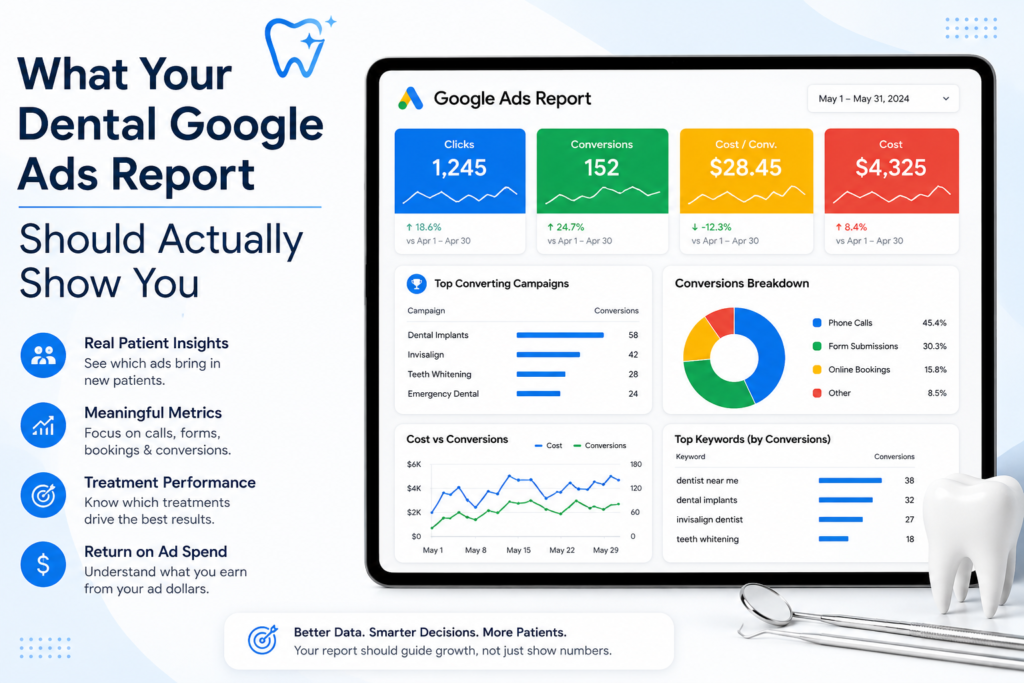
Why Most Dental Google Ads Reports Miss the Point
The average click-through rate for dental ads is 5.44% according to WordStream’s 2025 benchmarks — one of the lowest across all industries. Click-through rate tells you how often patients clicked your dental ads. It does not tell you how many of those patients booked an appointment, called the clinic, or converted into actual patients. Most dental practices are evaluating campaign performance on a metric that measures advertising activity, not patient acquisition.
Google Ads is built for high intent searchers — patients actively looking for a dentist right now, not browsing social media. The correct question is not ‘how many clicks did we get?’ It is ‘how many new patients did this campaign generate, and what did each one cost?’ A Google Ads report for a dental clinic should answer that question directly — every month, without you having to ask for the calculation.
If your agency’s monthly Google Ads report has no column for ‘cost per booked appointment’ or ‘new patients from ads,’ ask directly: how are you measuring whether this campaign is generating patients? The answer reveals whether your dental advertising is being managed for outcomes or for optics.
Campaign Structure: The Foundation of a Readable Google Ads Report
A Google Ads report is only as useful as the campaign structure behind it. Most dental practices run a single campaign covering every dental service — dental implants, teeth whitening, emergency dentist, cosmetic dentist, general dentistry, clear aligners for crooked teeth — in one ad group with one set of dental ads. When all dental services share a single campaign, your report cannot show you which services are generating new patients and which are burning ad spend without return.
Campaign structure should separate ad groups by service line for more targeted ads and better reporting. A separate ad group for dental implants, one for emergency dentist searches, one for teeth whitening, and one for same day appointments allows your Google Ads report to show performance at the service level — revealing exactly where your dental marketing investment is and isn’t working.
A well-structured report for dental practices shows performance broken down by campaign and ad group, not rolled up into a single total. Without that breakdown, you cannot identify whether your dental implant campaign is producing patient appointments or whether it’s consuming the budget that should be funding your emergency dentist campaign.
Conversion Tracking: The Most Important Section in the Report
Conversion tracking is the foundation of every decision in dental advertising. Google Analytics — specifically GA4 — and your Google Ads account must be linked from the first campaign launch. Without it, you cannot know which dental keywords are generating appointment bookings, which ads are producing phone calls, which landing pages are converting potential patients, or whether your overall investment is generating positive return.
In GA4, patient actions are configured as ‘key events’ — the terminology Google introduced in March 2024 to replace ‘goals’ and ‘conversions’ in GA4 reporting. Key events marked as important in GA4 are imported as conversion actions into Google Ads. If your Google Ads report still references ‘goals’ rather than ‘key events,’ your conversion tracking setup predates the March 2024 update and should be reviewed for accuracy.
Proper tracking for dental practices must capture: phone calls from ads via call tracking, online booking form completions, click-to-call events on landing pages, and scheduled appointments confirmed through your booking system. Call tracking is especially important — the majority of dental ad clicks come from mobile devices, and most of those patients call directly rather than completing a form. Without call tracking, you are missing the majority of your actual conversion data.
• Phone calls from ads — tracked via call tracking number, attributed to the specific campaign that generated the call
• Booking form completions — tracked as key events in GA4 and conversion actions in Google Ads
• Click-to-call events — captures mobile patients who tap the phone number directly from the ad
• Scheduled appointments — if your booking system supports it, the most accurate conversion to track

The Best Keywords Section: Search Terms and Negative Keywords
Two of the most revealing sections in any dental Google Ads report are the search terms report and the negative keywords list — both products of ongoing keyword research — and they are two of the most commonly omitted from agency summaries.
Using negative keywords can save 20–40% of ad spend on irrelevant searches. Without a negative keywords list, your dental ads appear for searches like ‘dental assistant jobs,’ ‘free dental care Canada,’ ‘dental school,’ and ‘dental billing software’ — clicks that cost money but will never convert into actual patients. Standard dental advertising exclusions — ‘jobs,’ ‘career,’ ‘free,’ ‘school,’ ‘course,’ ‘salary,’ ‘DIY,’ ‘how to’ — should be active from day one of the first campaign.
The search terms report shows the exact queries that triggered your dental ads. Best keywords for dental practices are high-intent, location-specific terms: ’emergency dentist near me,’ ‘dental implants consultation Toronto,’ ‘dentist near me accepting new patients,’ ‘same day appointments cosmetic dentist.’ A well-managed campaign shows search terms tightly aligned with dental services. A poorly managed campaign shows irrelevant queries — indicating the negative keywords list is insufficient and your budget is reaching undecided patients who are nowhere near ready to book.
Your Google Ads report should confirm how many negative keywords are active and document additions made during the reporting period. A campaign with fewer than 30 negative keywords has almost certainly not had its search terms report reviewed properly. A growing negative keywords list is a signal of active campaign management and continuous optimization.
Cost Per Lead, Cost Per Conversion, and What They Mean for Dental Care
Most dental practices generate leads at $15–$60 each depending on market competitiveness and campaign structure. Your Google Ads report should show cost per lead explicitly — total ad spend divided by total conversion actions tracked. Dental keywords typically cost $3–$20 USD per click depending on location, with emergency dental keywords ranging from $6–$15 USD and dental implant keywords at the higher end. All WordStream and LocaliQ benchmark figures are in USD — Canadian market costs vary and should be compared against local data.
Unlike social media marketing or direct mail, Google Ads targets high intent searches — patients actively looking for dental care right now. Cost-Per-Conversion (CPA) measures how efficiently campaigns generate patient actions. Return on Ad Spend (ROAS) measures revenue generated per dollar of ad spend. Click-Through Rate (CTR) is calculated by dividing clicks by impressions — useful for assessing ad copy performance but not a measure of patient acquisition. Your report should include all three, clearly labelled, with month-over-month comparison so you can see whether campaign performance is improving or declining.
A/B testing ad copy can lower cost per acquisition by 32%. If your Google Ads report shows no record of copy testing, no learning is accumulating and no CPA improvement is happening. A stagnant dental advertising campaign with no copy testing is being maintained, not managed.
Geographic Targeting: Are Your Ads Reaching Local Patients?
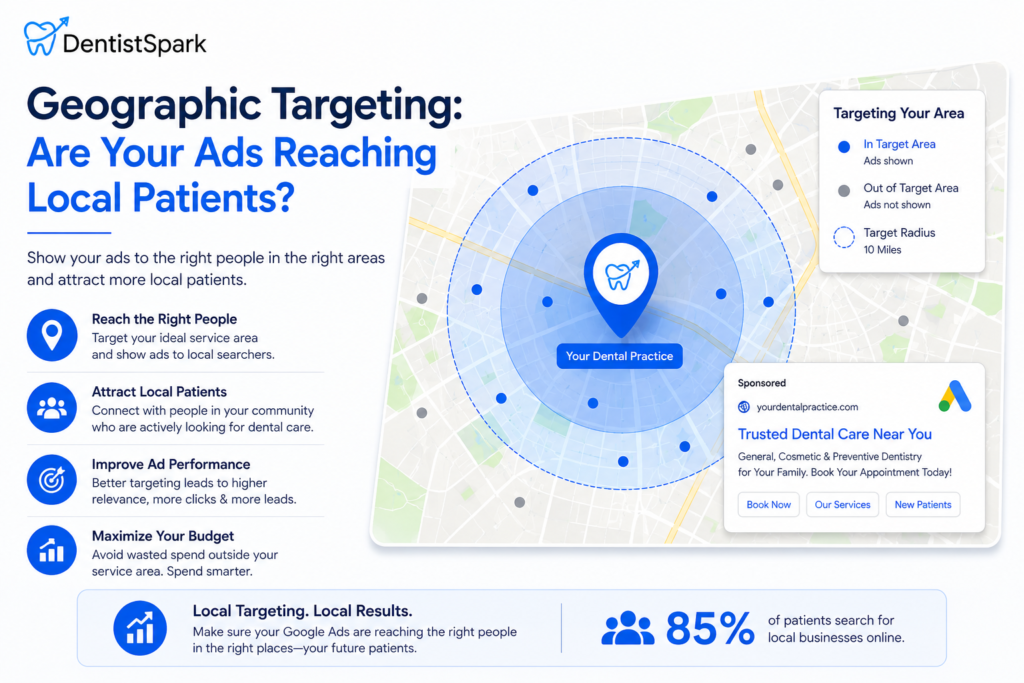
Local searches account for 30% of all mobile queries. For dental care, that means most searches for an emergency dentist, a cosmetic dentist, or a dentist near me are happening on a mobile device within the patient’s immediate area. Your Google Ads report should show a geographic breakdown — which postal codes and neighbourhoods are generating conversions versus which are generating clicks with no appointment bookings.
A dental clinic in North York should not be paying for clicks from patients in Mississauga. Geographic targeting in a Google Ads report reveals whether your ad spend is concentrated in your actual service area or leaking into surrounding regions where patients will never convert. Bid adjustments — investing more in the postal codes that convert and reducing spend in areas that don’t — are a standard continuous optimization lever. If your report shows no geographic data, this lever is not being used.
Patient testimonials and social proof on landing pages improve conversion rates for patients who click through from dental ads. For dental practices in small town markets or single-neighbourhood locations, geographic targeting is even more critical. Local relevance — ads that reference the specific neighbourhood or city — improves quality score, reduces cost per click, and increases the probability that the right patient type sees your dental ads in the right context.
Campaign Performance Signals: What Healthy Dental Advertising Looks Like
A well-managed dental Google Ads campaign converts potential patients into actual patients — both new patients and existing patients who need additional dental care. It shows improving cost per lead over the first three to six months as conversion data accumulates. Search terms increasingly align with high-intent dental keywords. Quality score remains above 7 for primary keywords. Geographic performance is concentrated in the practice’s actual service area. The negative keywords list grows monthly as the search terms report is reviewed.
Targeting high-intent keywords can reduce costs by 30% compared to broad match campaigns. Campaigns typically take 2–3 months for full optimisation as the algorithm accumulates conversion data and Smart Bidding learns from actual patient behaviour. A Google Ads report showing flat or worsening performance over three consecutive months without documented optimisation actions is a signal that the campaign is being maintained, not actively managed for maximum ROI.
Smart Bidding strategies like maximize conversions and target CPA are designed to reach the highest intent patients at the moment they are most likely to book. Display campaigns targeting previous website visitors, retargeting dental ads to patients who visited your landing page but didn’t book, and Local Service Ads appearing above traditional search results are all campaign types that should appear in your reporting if they are active. Each represents a different strategy for reaching potential patients at different stages of their decision — and each needs its own performance data to be evaluated correctly.
Red Flags in a Dental Google Ads Report
• No conversion tracking data — tracking is broken or was never configured; all budget decisions are guesswork
• CTR presented as the primary success metric — click-through rate measures ad appeal, not patient acquisition
• ‘Goals’ terminology in GA4 reporting — predates the March 2024 key events update; setup should be reviewed
• No search terms breakdown — the most revealing report section is being hidden or ignored
• Single campaign covering all dental services — prevents service-level performance analysis
• No geographic breakdown — ad spend is almost certainly reaching patients outside your service area
• No month-over-month comparison — campaign performance cannot be assessed without trend context
• No negative keywords list or record of additions — budget is being wasted on irrelevant searches every month
Why Dentist Spark for Dental Marketing and Google Ads Reporting
Dentist Spark manages Google Ads campaigns exclusively for dental practices across Canada. We help dental clinics get more patients from paid search — not just more clicks. Every monthly Google Ads report we produce includes cost per new patient contacted, search terms analysis with negative keyword additions, geographic performance breakdown, quality score monitoring, conversion tracking confirmation, and month-over-month trend comparison.
Our reports are built around the metrics that determine whether your dental clinic is growing — not the metrics that make a campaign look active. If your current Google Ads report doesn’t show you cost per booked appointment, we’ll show you what that number should be for your market and dental service mix, and build the campaign structure and conversion tracking that makes it measurable from day one.
Not Sure If Your Dental Google Ads Are Working?
Book a free Google Ads audit with Dentist Spark. We’ll review your current account, identify what your Google Ads report is missing, and show you the actual cost per new patient your campaign is generating — or explain clearly why it isn’t generating any.
→ Book Your Free Google Ads Audit at DentistSpark.com
Frequently Asked Questions
What should a dental Google Ads report include for dental practices?
A dental Google Ads report should include cost per lead, cost per booked appointment, search terms performance with negative keywords list status, campaign structure breakdown by dental service, geographic targeting performance, quality score by keyword, conversion tracking confirmation, ad copy test results, and month-over-month trend. A report showing only impressions, clicks, and total ad spend is a billing summary — it measures dental advertising activity, not patient acquisition for dental practices.
What is the difference between dental ads campaign structure and campaign goals?
Campaign structure refers to how your Google Ads account is organised — separate campaigns and ad groups for each dental service (dental implants, emergency dentist, teeth whitening, cosmetic dentist, general dentistry). Campaign goals refer to the conversion actions you are optimising toward — new patient calls, booking form completions, scheduled appointments. Good campaign structure makes campaign goals measurable at the service level, so you can see which dental services are generating patients and which need optimisation.
How does conversion tracking work for dental marketing campaigns?
In GA4, patient actions are configured as ‘key events’ — the term that replaced ‘goals’ in March 2024. Key events for a dental clinic include phone calls via call tracking, booking form completions, and click-to-call events on landing pages. These key events are imported as conversion actions into Google Ads, where they inform Smart Bidding and campaign performance reporting. Without proper conversion tracking, cost per lead and cost per new patient cannot be calculated accurately.
What is a good cost per lead for dental advertising?
Most dental practices generate leads at $15–$60 USD each, with emergency dental keywords ranging from $6–$15 USD per click and dental implant keywords at the higher end of the scale. Canadian market costs vary from these USD benchmarks. The relevant benchmark is not the industry average — it is your own patient lifetime value. If a new patient is worth $1,000 in their first year of dental care, a cost per booking below $150 represents strong return regardless of how it compares to other dental clinics.
How do I know if my dental clinic’s best keywords are being targeted correctly?
Review your search terms report — available in Google Ads under Campaign reports. The best keywords for dental practices are high-intent, location-specific terms like ’emergency dentist near me,’ ‘dental implants consultation [city],’ and ‘same day appointments dentist.’ If your search terms report shows irrelevant queries — jobs, school, free dental care — your negative keywords list is insufficient and your dental advertising budget is being wasted on patients who will never book an appointment.
Conclusion
A Google Ads report is only useful when it delivers actionable insights — not just raw data. Conversion rates, cost per lead, geographic performance, and search terms data all exist to drive continuous improvement in your campaign. A Google Ads report that tells you only whether it is generating clicks is not actionable. The sections covered in this guide — conversion tracking, campaign structure, search terms and negative keywords, cost per lead, geographic targeting, and month-over-month trend — are the minimum a dental practice should expect to see every month.
If your current report is missing most of them, you are making ad spend decisions without the information required to make them correctly. The metrics that matter for a dental clinic are: how many patients did this campaign bring in, and what did each one cost? Every other number in the Google Ads report exists to explain or improve those two. Dentist Spark builds every dental marketing campaign around that clarity — from campaign structure through to monthly reporting.