Dentist Spark | Dental Website UX | Patient Bounce Rate | Canadian Dental Marketing | North York
Introduction
The average dental website bounce rate is 41–51%, according to Accelerate Dental Marketing — meaning roughly half of all visitors leave without booking, calling, or scrolling past the first section. For most dental clinics, the problem isn’t lack of patient demand. It’s that the website is triggering an immediate exit before trust can be established.
Patients don’t leave dental websites because they don’t need dental care. They leave because something in the first few seconds failed them — a slow load, a confusing layout, a missing reassurance, or a page that didn’t feel relevant to their situation. This guide identifies the five most common exit triggers for dental websites and the specific fixes that stop them.
Key Takeaways
✓ A bounce rate of 41–51% is average for dental websites — roughly half of all visitors leave without taking any action.
✓ Patients leave for five specific, fixable reasons — not because they don’t need dental care.
✓ Mobile load time is the single highest-impact fix: a page that takes more than 3 seconds to load loses most mobile visitors.
✓ Canadian Dental Care Plan (CDCP) eligibility information on your dental website directly reduces exit intent for eligible patients.
✓ Ontario dental clinics: RCDSO prohibits patient testimonials on clinic websites — use Google ratings as trust signals instead.
Exit Trigger 1: The Dental Website Loads Too Slowly
Every 1-second delay in page load time reduces conversions by up to 7%. For mobile users — who represent the majority of dental searches — a dental website that takes more than 3 seconds to load loses most visitors before they read a single word about your dental services.
Speed problems are caused by uncompressed images, render-blocking JavaScript, no browser caching, or hosting too slow for the site’s traffic. A patient searching for a toronto dentist, a north york dental clinic, or a family dentist downtown toronto abandons a slow site and searches again — finding a competitor whose site loaded first.
How to Diagnose It
• Run your dental website URL through Google PageSpeed Insights — it scores your page and lists specific fixes in priority order
• Test on mobile separately from desktop — mobile performance is what most patients experience
• Check your Largest Contentful Paint (LCP) score — Google considers under 2.5 seconds good; above 4 seconds is poor
How to Fix It
• Compress all images to WebP format — images are the most common cause of slow dental websites
• Enable browser caching — returning patients load pages faster when static files are stored locally
• Minify CSS and JavaScript files — reduces file size without changing functionality
• Consider a content delivery network — serves your dental website from servers closer to each patient’s location
Exit Trigger 2: The Mobile Experience Is Broken
88% of smartphone users visit a local business within a day of searching. Most dental searches happen on a phone. A dental website designed primarily for desktop — with small text, horizontal scrolling, or a dental appointment form that requires zooming — is functionally broken for the majority of your prospective patients.
Mobile-broken doesn’t mean the site looks wrong. It means the patient experience on mobile creates friction. A booking button too small to tap. A phone number that isn’t click-to-call. A dental appointment request form that requires switching between keyboard types. Each friction point increases the probability of abandonment. For patients seeking same day appointments, dental emergency care, or immediate treatment for dental pain — friction is enough to send them to another dental clinic.
How to Diagnose It
• Open your dental website on your own phone — navigate to three service pages and try to complete the booking form
• Run Google’s Mobile-Friendly Test — flags specific elements causing mobile usability problems
• Check GA4 data by device — compare bounce rates for mobile vs desktop; a large gap signals a mobile-specific problem
How to Fix It
• Implement responsive design — layout adapts to screen size rather than shrinking
• Make all tap targets at least 48×48 pixels — Google’s minimum for accurate mobile tapping
• Make your phone number a click-to-call link — patients on mobile should call with one tap
• Test the dental appointment form on mobile before every redesign — forms are where mobile experience most commonly breaks
Exit Trigger 3: The First 5 Seconds Don’t Answer the Patient’s Question
A patient who lands on your dental website arrived because they searched for something specific — an emergency dentist for broken teeth, teeth grinding damage, or dental pain, a toronto dentist accepting new patients, a north york dental clinic for routine checkups, or a family dentistry practice conveniently located near them. If the page doesn’t immediately confirm that you offer what they searched for, they leave.
Research shows you have approximately 4 seconds to grab a website visitor’s attention. If the headline says ‘Welcome to [Practice Name]’ rather than ‘North York Family Dentist — Accepting New Patients — Same Day Appointments Available,’ the patient doesn’t know whether they’re in the right place. They leave to find a dental clinic whose website confirms relevance immediately.
This applies to every dental service page — not just the homepage. A page for dental implants should immediately confirm treatment options and that your dental clinic offers implants to replace missing teeth. A page for root canal treatment should address the patient’s concern about dental pain before describing the procedure. A page for cosmetic dentistry should show what outcomes look like before explaining the process. We also offer ads for dentists.
How to Diagnose It
• Ask someone unfamiliar with your dental clinic to look at your homepage for 5 seconds — then ask: what does this practice offer and who is it for?
• Check your above-the-fold content on mobile — what does a patient see before they scroll on a standard phone screen?
• Review GA4 engagement time — pages with average engagement under 10 seconds have a clarity problem
How to Fix It
• Lead the headline with patient search intent — not your practice name; what the patient was looking for
• State your location in the first section — ‘north york dentist’ or ‘downtown toronto dental clinic’ confirms geography immediately
• Confirm availability — ‘accepting new patients’ or ‘same day appointments for dental emergencies’ reduces exit intent instantly

Exit Trigger 4: No Visible Trust Signal — Including CDCP and Insurance Information
A patient who doesn’t know your dental clinic arrives with zero baseline trust. In the first few seconds of their visit, they are making a rapid assessment: does this look like a legitimate, quality dental practice that can handle my dental care? The design, imagery, and visible credentials either confirm or undermine that assessment before any content is read.
Customers are 2.7 times more likely to consider a business reputable when they find a complete Business Profile on Google. Your Google star rating and review count — prominently displayed on your dental website — transfers that trust signal onto the page the patient is reading.
The Canadian Dental Care Plan — a Critical Trust and Conversion Signal
The Canadian Dental Care Plan (CDCP) is now open to all eligible Canadians with household income under $90,000 who do not have private dental insurance. As of July 2025, the dental care plan CDCP covers eligible patients for preventive, diagnostic, restorative, and some oral surgery services. Many patients searching for affordable dental care, free dental care, or CDCP coverage are specifically looking for a dental clinic that accepts the plan.
If your dental website does not clearly communicate whether you accept the Canadian dental care plan, eligible patients leave immediately — not because of your quality, but because they can’t confirm their coverage will work. A single line — ‘We accept the Canadian Dental Care Plan (CDCP). Learn about your CDCP coverage and what services are included’ — can recover a significant share of these exits. A dedicated page about CDCP coverage, eligibility, and what dental services are covered under the dental care plan CDCP adds local SEO value for patients searching these terms specifically.
Alongside CDCP coverage, display your acceptance of private dental insurance, direct billing availability, and flexible payment plans. Patients with private insurance or no coverage both need to see that their situation is addressed. Dental insurance information, frequency limits, and co-payment expectations all reduce exit intent from cost-anxious patients seeking routine dental care, dental cleanings, teeth whitening, or dental implants to replace missing teeth.
Ontario Clinics — RCDSO Compliance on Testimonials
The RCDSO prohibits Ontario dental clinics from posting patient testimonials on clinic websites and social media operated by the practice. Display your Google star rating and review count with a link to your Google Business Profile instead. See our full guide to dental advertising rules in Canada for the complete compliance picture.
How to Fix It
• Display Google star rating prominently — ‘4.9 stars — 280 Google reviews’ is more persuasive than any dental marketing copy
• Add CDCP acceptance statement — with a link to a dedicated CDCP coverage page for eligible patients
• List private insurance and direct billing — confirm which plans you work with near the top of the page
• Replace stock photos with real team and clinic photos — authenticity is the most effective trust signal for a dental website
• Show dental professionals’ credentials — dental surgeons, dental hygienist qualifications, and specialist designations visibly displayed
Exit Trigger 5: The Booking Path Is Unclear or Too Long
77% of patients prefer providers that offer online scheduling, yet the majority of dental websites either have no online booking or require patients to navigate through multiple pages to find a dental appointment request form. A patient who has decided they want to book — but can’t immediately see how — exits and finds a dental clinic that makes it easier.
The booking path must be frictionless. A visible call to action on every page. A phone number that is click-to-call on mobile. A dental appointment form that asks for the minimum required information. An expectation of when the patient will hear back. For patients seeking dental emergency care, same day appointments, or immediate treatment — every extra step is a reason to call a different dental office.
This is particularly important for patients searching for services with high immediate intent: dental emergency, dental surgery, wisdom tooth removal, gum disease treatment to preserve the natural tooth, dental medicine for dental pain, wisdom teeth extractions, dental pain, or broken teeth. These patients are not browsing — they need to contact your dental clinic immediately. If your website doesn’t make that action obvious within the first five seconds, they move on.
How to Diagnose It
• Count the clicks required to book from your homepage — more than two clicks is too many for a patient in dental pain
• Check whether your dental appointment form is above the fold on mobile — if not, most mobile patients won’t find it
• Look at GA4 form completion rate — a high view rate with low completion indicates a form friction problem
How to Fix It
• Add a ‘Book Now’ or ‘Request Dental Appointment’ button to your navigation — visible on every page without scrolling
• Place a booking form or click-to-call button above the fold on all key pages — homepage, dental services pages, dental emergency page
• Reduce form fields to the minimum — name, phone number, and preferred time is sufficient for initial contact
• Add same day appointment language for dental emergencies — ‘same day appointments available for dental pain and broken teeth’
The Dental Website Audit: Diagnosing Your Specific Exit Triggers
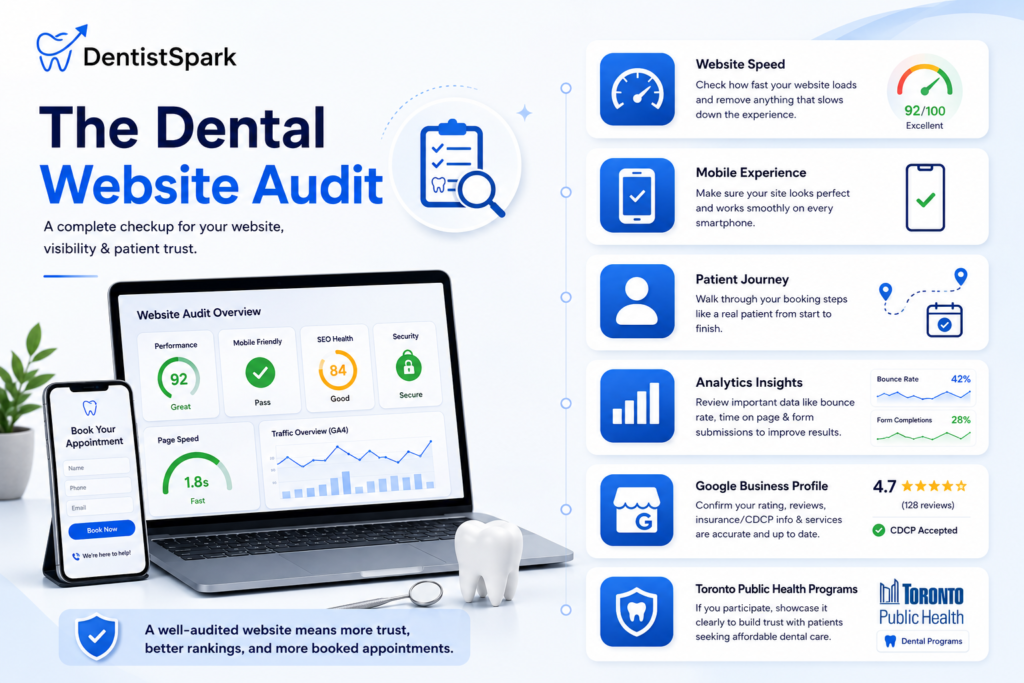
Most dental website exit trigger problems are diagnosable in under 30 minutes using free tools — without a developer or dental marketing agency.
• Google PageSpeed Insights — load speed and Core Web Vitals on desktop and mobile
• Google Mobile-Friendly Test — specific mobile usability issues on your dental website
• Your own phone — navigate the full booking journey as a patient would for routine dental care and dental emergency pages
• GA4 (if configured) — bounce rate by device, engagement time by page, dental appointment form completion rate
• Google Business Profile — confirm your rating, review count, CDCP acceptance status, and dental services listed are accurate
• Toronto Public Health dental programs — if your dental clinic participates in toronto public health programs, list this prominently as a trust signal for eligible patients seeking affordable dental care
Cosmetic procedures like invisalign braces (align technology), composite resin fillings, composite fillings, and teeth whitening all benefit from dedicated dental website pages that answer patient questions before they exit. A dental clinic in north york, downtown toronto, or any Canadian market that addresses its top two or three exit triggers will see measurable improvement in patient enquiries within 60 to 90 days — without changing ad spend or dental marketing strategy. The website was losing the patients that marketing was already delivering.
Why Dentist Spark for Dental Website Performance
Patients who visit a dentist regularly maintain a healthier smile. A smile healthy dental website — one that converts visitors into patients — makes booking routine care, emergency dental services, and specialist treatments equally accessible. Dentist Spark audits dental websites for the specific exit triggers that cost Canadian dental clinics patient enquiries — load speed, mobile experience, first-impression clarity, trust signals including CDCP and insurance information, and booking path friction. We identify the highest-impact issue first and fix it before moving to the next.
If your dental website is attracting visitors but not converting them into patient enquiries — for dental care, cosmetic dentistry, dental hygiene visits, oral health assessments, or dental implants — the problem is almost always one of these five triggers. Our website audit makes that diagnosis in a single session.
Are Patients Leaving Your Dental Website Before Booking?
Book a free dental website audit with Dentist Spark. We’ll identify which of the five exit triggers is costing your dental clinic the most patient enquiries — and show you the specific fixes that stop them.
→ Book Your Free Website Audit at DentistSpark.com
Frequently Asked Questions
What is a normal bounce rate for a dental website accepting new patients?
A bounce rate of 41–51% is average for dental websites. A rate consistently above 70% indicates a significant problem with the patient experience — most commonly slow load time, a broken mobile experience, or unclear above-the-fold content. A rate below 40% typically indicates a well-optimised dental website with strong first-impression clarity and visible dental services, dental appointment booking, and trust signals.
How should a dental clinic display Canadian Dental Care Plan information on its website?
The Canadian Dental Care Plan (CDCP) covers eligible Canadians with household income under $90,000 who do not have private dental insurance. Your dental website should clearly state whether your dental clinic accepts the CDCP, which dental services are included under dental care plan CDCP coverage, and what patients should bring to their dental appointment. A dedicated CDCP coverage page improves both patient clarity and local SEO for patients searching for CDCP coverage in your area.
What dental services, dental hygiene, cosmetic dentistry, and dental implants pages prevent exits?
A dental website that clearly lists dental treatments — with dedicated pages for each treatment plan and treatment options — improves overall health outcomes for patients who find the right care faster. Every dental service your dental clinic offers should have its own page: routine dental care including teeth cleaning and dental cleanings; dental implants to replace missing teeth and full or partial dentures; cosmetic dentistry and teeth whitening; root canal treatment; dental surgery, oral and maxillofacial surgery, and maxillofacial surgery services; wisdom tooth removal and wisdom teeth extractions; dental emergency and urgent care; family dentistry; dental hygiene visits; tooth fillings and composite fillings; and general dentistry by general dentists for routine visits and dental work. Each page should confirm accepting new patients, CDCP coverage eligibility, and dental appointment booking options.
How does a dental website address patients searching for a dental appointment or dental emergency?
A dental website that converts patients searching for a dental appointment places a visible booking form or click-to-call button above the fold on every page — including the homepage, dental services pages, and the dental emergency page. The booking path should require two clicks or fewer from any page. For patients seeking same day appointments for dental pain, broken teeth, or dental emergency, immediate contact options must be visible without scrolling on mobile devices.
How does dental care plan cdcp coverage information on a dental website attract eligible patients?
As of July 2025, the Canadian Dental Care Plan is open to all eligible Canadians who meet income and insurance criteria. Eligible patients — including eligible Canadians searching for affordable dental care, dental care plan CDCP coverage, or free dental care options — actively search for dental clinics that accept the plan. A dental website that clearly displays CDCP acceptance, explains cdcp coverage for dental services including dental cleanings, oral health assessments, and some dental surgery services, and lists what eligible patients should bring reduces exit intent and improves conversion for this growing patient group.
Conclusion
A dental website that loses half its visitors in under 10 seconds isn’t failing because patients don’t need dental care. It’s failing because something in those first 10 seconds gave them a reason to leave before finding a reason to stay.
The five exit triggers — slow load time, broken mobile experience, unclear first impression, missing trust signals, and a complicated booking path — account for the majority of dental website abandonment. Each is diagnosable in minutes. Start with whichever your current data points to most clearly. For Canadian dental clinics, adding clear CDCP coverage information is one of the fastest, highest-return additions a dental website can make in 2025 — reaching eligible patients at the exact moment they’re deciding where to book their dental appointment.