Dentist Spark | Dental Website Speed | Site Performance | Canadian Dental Marketing
Key Takeaways
✓ A slow dental website directly suppresses search engine rankings and loses patient bookings silently.
✓ Google measures site performance using three Core Web Vitals: Largest Contentful Paint, Cumulative Layout Shift, and Interaction to Next Paint.
✓ The most common speed killers are unoptimised image sizes, render-blocking CSS and JavaScript files, and excessive HTTP requests.
✓ A content delivery network, browser caching, and image compression are the three highest-impact fixes for most dental websites.
✓ Over half of all healthcare searches happen on mobile — slow mobile load times cost rankings and patients simultaneously.
Google uses site speed as an SEO ranking signal. A slow dental website ranks lower in search results. Lower rankings mean fewer visitors. Fewer visitors mean fewer new patient appointments. Most visitors abandon a page that takes more than three seconds to load — and for a dental practice, every lost visitor is a lost booking.
Website speed directly affects your search engine rankings, your user experience, and how many prospective patients actually reach your online booking form. This guide explains what causes a slow website, how to measure site performance, and the specific fixes that recover lost patient bookings.
Why Dental Website Speed Affects Patient Bookings
Over half of all healthcare searches happen on smartphones. Mobile users expect pages to load quickly. A dental website that loads slowly on mobile devices loses the majority of its potential patient traffic before a single word is read.
Websites that load slowly are ranked lower by Google — not because of a manual penalty, but because page experience is a confirmed ranking signal. A fast dental website earns stronger positions in local search results. A slow one is deprioritised in favour of competitors whose websites perform better.
Websites should aim to show content in under 3 seconds. Every additional second of load time increases the likelihood that a prospective patient leaves before booking.
The Three Core Web Vitals That Determine Dental Website Performance
Google measures web performance using Core Web Vitals — three specific metrics that reflect real user experience on your dental website. As of March 2024, the three official Core Web Vitals are Largest Contentful Paint (LCP), Cumulative Layout Shift (CLS), and Interaction to Next Paint (INP). TTFB (Time to First Byte) is an important diagnostic metric but is not one of the three Core Web Vitals.
1. Largest Contentful Paint (LCP) — Loading Performance
Largest Contentful Paint measures how quickly the largest visible element loads. For most dental websites, that is a hero image or banner. Google considers an LCP under 2.5 seconds good. A slow LCP is usually caused by unoptimised image sizes or render-blocking CSS and JavaScript files. Optimising images reduces load time significantly — the single highest-impact fix for most dental websites.
2. Cumulative Layout Shift (CLS) — Visual Stability
Cumulative Layout Shift measures visual stability. It captures how much page elements unexpectedly move as the page loads. A patient trying to click a booking button that jumps before they can tap it is experiencing poor CLS. Google considers a CLS score under 0.1 good. Defining explicit dimensions on images and reserving space for embeds eliminates most layout shift issues on dental websites.
3. Interaction to Next Paint (INP) — Responsiveness
Interaction to Next Paint replaced First Input Delay (FID) as the interactivity Core Web Vital in March 2024. INP measures how quickly a page responds to all user interactions throughout a session — clicks, taps, and keyboard input. For dental websites, this matters when patients navigate between service pages, submit booking forms, or interact with chat widgets. Google considers an INP under 200ms good. Poor INP is usually caused by heavy JavaScript blocking the browser’s response to user actions.
TTFB — A Key Supplemental Metric (Not a Core Web Vital)
Time to First Byte (TTFB) measures how quickly your server responds to a browser request. A TTFB below 200ms is considered good for web performance. While TTFB is not one of the three Core Web Vitals, it is an important supplemental metric — slow server response delays every element on the page. Poor TTFB is caused by unoptimised server configuration, slow hosting, or excessive database queries. A content delivery network significantly improves TTFB.

What Causes a Slow Dental Website
Unoptimised Image Sizes
Images often take the longest to load on a website. Most dental websites upload full-resolution photos without compression. A single unoptimised image can add several seconds to page load time. Compress images to WebP format. Set explicit width and height attributes. Use lazy loading for images below the fold.
Render-Blocking CSS and JavaScript Files
CSS files and JavaScript files that load before the browser can display page content block the entire render process. Minifying CSS and JavaScript files enhances loading speed. Defer non-critical JavaScript. Load CSS asynchronously where possible. These changes allow the browser to show visible content faster — even before all resources finish loading.
Excessive HTTP Requests
Every element on a web page generates an HTTP request. Multiple requests multiply load time. Combine files where possible. Remove unused plugins and scripts. A streamlined page with fewer resources loads faster on both desktop and mobile devices.
No Content Delivery Network
A content delivery network stores static files in servers around the world. When a patient visits your dental website, the CDN serves content from the geographically closest server. Using a CDN decreases load times for users regardless of their location and reduces the load on your origin server.
No Browser Cache
Browser cache stores static files in a temporary storage location on the visitor’s device. Returning patients load your dental website faster because their browser retrieves stored resources instead of downloading them again. Enabling cache headers on static assets is a simple, high-impact fix.
How to Run a Dental Website Speed Test
Several free tools measure site performance with accurate data from multiple global locations.
• Google PageSpeed Insights — returns Core Web Vitals data, real user metrics, and specific fix recommendations. Start here.
• Pingdom — tests website load time from over 70 global polling locations with a full HTTP request breakdown.
• DebugBear — tests site speed from 30 global test locations with a visual filmstrip of page load events.
• Uptrends — allows testing website speed from worldwide locations across different devices.
Run a speed test from at least two tools for accurate data. Test on mobile and desktop separately — performance problems often appear only on mobile devices.
Real user monitoring shows how actual visitors experience your dental website. Google Search Console’s Core Web Vitals report provides field data collected from Chrome users visiting your pages in real-world conditions.
How Website Speed Connects to Dental SEO and Search Rankings
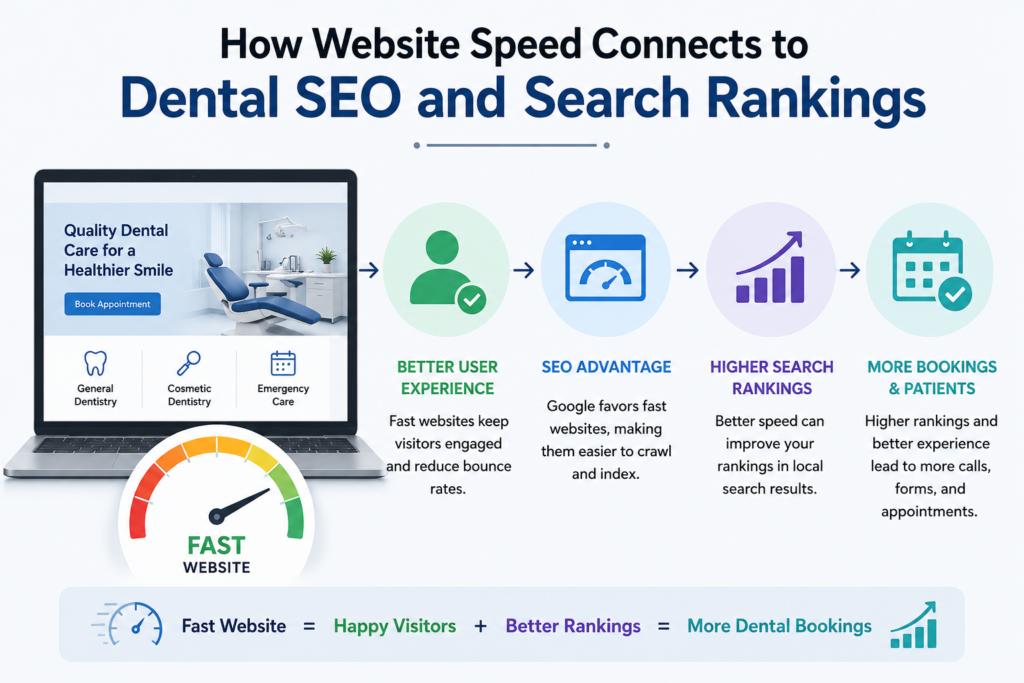
Page speed is a confirmed Google ranking factor. A dental website with strong Core Web Vitals scores is ranked higher than an equivalent site that performs poorly. This is not a penalty — it is a quality signal. Google deprioritises slow websites in favour of ones that deliver a better patient experience.
Page load time also affects how long visitors stay on your site. A patient who lands on a slow page leaves immediately. That departure signals low engagement to Google and further suppresses search rankings over time. Speed, rankings, and patient conversion rates are directly linked.
Why Dentist Spark for Dental Website Performance
Dentist Spark audits dental websites against current Core Web Vitals benchmarks — identifying specific LCP, CLS, and INP issues, plus supplemental metrics like TTFB, that are holding your practice back in search rankings.
We fix the issues that matter: image compression, CSS and JavaScript minification, CDN configuration, browser cache setup, and Core Web Vitals remediation. Every fix is tracked against real user data to confirm measurable improvement in actual patient experience.
Is Your Dental Website Losing Patients to Slow Load Times?
Book a free website performance audit with Dentist Spark. We’ll run a full speed test on your dental website, identify the exact issues costing you bookings, and show you what a fast, patient-ready website looks like for your practice.
→ Book Your Free Audit at DentistSpark.com
Frequently Asked Questions
How does dental website load time affect patient bookings?
Faster loading pages lead to higher conversion rates. A dental website that takes more than three seconds to load loses most mobile visitors before they see your services. Google also uses site speed as a ranking signal — a slow site is ranked lower, reaching fewer prospective patients and generating fewer appointment inquiries from local search.
What are the three Core Web Vitals for a dental website?
The three Core Web Vitals are Largest Contentful Paint (LCP), which measures loading performance; Cumulative Layout Shift (CLS), which measures visual stability; and Interaction to Next Paint (INP), which measures responsiveness to user actions. These replaced the previous set in March 2024 when INP replaced First Input Delay. TTFB is an important supplemental metric but is not one of the three Core Web Vitals.
What is Time to First Byte and why does it matter?
A Time to First Byte under 200ms is considered good for web performance. TTFB measures how quickly your server responds to a browser request — slow TTFB delays every element that follows on the page. It is a supplemental diagnostic metric rather than a Core Web Vital. Common causes include slow hosting, unoptimised server configuration, and excessive HTTP requests. A content delivery network significantly improves TTFB for patients visiting from different locations.
How do I fix slow image load times on a dental website?
Optimising images reduces load time significantly. Convert images to WebP format for smaller file sizes at equivalent visual quality. Set explicit width and height on all images to eliminate cumulative layout shift. Use lazy loading so images below the fold only load when a patient scrolls to them — the most impactful fix for mobile page speed on most dental websites.
How does a content delivery network help a dental website?
A CDN stores your dental website’s static files — images, CSS files, HTML files — across servers globally. When a patient visits your site, the CDN delivers content from the nearest location. This reduces load times, lowers TTFB, and decreases HTTP requests processed by your origin server — improving performance across all devices and network conditions.
Conclusion
A slow dental website is a quiet revenue leak. It is ranked lower in search results. It frustrates mobile users. It causes patients to leave before booking. Fixing website speed means addressing image sizes, CSS and JavaScript files, HTTP requests, browser cache, and server response time — tracked against the three Core Web Vitals (LCP, CLS, INP) to confirm measurable improvement.
A fast dental website is not a luxury. It is the baseline patients expect before they trust a practice with their care.
Dentist Spark | Dental Website Speed | Core Web Vitals | Site Performance | DentistSpark.com